Posts

Let's Scrap - Brave

Image
It's time for a "blast from the past" sketch over at Let's Scrap . This was a very fun sketch to work with. I did change it up a little bit. I turned the left side of the sketch to the right a bit and worked with the right side as it was. Check it out below: The Sketch: My Take: To Create This Layout I Used: DCWV: The Marquee Stack Recollections: planner stickers - journal words Cricut Cartridges: Disney Princess Dreams Come True - bow and arrow (upper right corner) DC Comics: Batman - targets When I Was a Kid - arrow borders Bits and Pieces - banners Etsy - CheeryDrearyCreations - Brave Dream (Merida) Svg - unknown orgin - bow and arrow Dafont - system font - Viking Normal Thank you so much for stopping by! Blessings,

Valentine's Day - Challenge 319

Image
 Happy Monday and welcome to another Monday challenge! Challenge #318- Valentines Day Make a project using anything heart/Valentine related. But there has to be a least one cut from the Cricut Library! This Weeks Sponsor is- And the prize is- $25 Virtual Wallet!!!! To qualify for the prize, be sure to use at least 1 Cricut cut on your project and if it's not obvious, let us know what cartridge you used. If you use a Cricut Explore machine, at least one cut must be from the Cricut catalog of images. If it isn't a card, you will get two entries into the drawing! Here is my project- I love working with other svg files as well as with my Cricut files. This one combines some svg images from Creatables , our sponsor this week and a traditional Cricut cut. Creatables svg - mail box and letters Wild Card Cricut Cartridge - sentiment I added some twine and glitter to finish it up. Now it's your turn!!! Blessin...

Let's Scrap - Family

Image
A few years ago I made a scrapbook album for a friend of mine for Christmas. Since then I've been making her more layouts to add to that original album. This year is no different. I decided to use one of the Let's Scrap blog's fabulous sketches! This page turned out so cute and once she adds pictures to it, it will be a very fun page! The Sketch: My Take: To Create this Layout I used: DCWV: The Marquee paper stack Bits and Pieces Cricut Cartridge: banner pocket fronts Basic Cricut Shapes - photo frames EK Designs Punch - banner pieces (bottom of layout) Thank you so much for stopping by! Blessings,     

Let's Scrap - Inside Out

Image
We have a wonderful sketch over at Let's Scrap this week, it is definitely a must try! It's a fun sketch with some great possibilites! I used the right side as normal and I turned the right side. The Sketch My Take: To Create this Sketch I used the following: Cricut Cartridges and svg cuts Sentimentals - tags Wild Card - shapes Bits and Pieces - banners Chalkboard Fonts - "Joy" and "Sadness" Amastery Hand system font - "Inside Out" Krafty Nook svgs - Inside Out Character Tsum Tsums DCWV - Collage Art Stack twine arrow paper clips And now for a closer look: Thank you so much for stopping by!!! Blessings,

New Cartridge - Challenge 317

Image
 Happy Monday and welcome to another Monday challenge! Challenge #317- Something New Make a project using a new cartridge, embellishiment, or image. But there has to be a least one cut from the Cricut Library! This Weeks Sponsor And the prize is- A $10 coupon code for anything in the store! To qualify for the prize, be sure to use at least 1 Cricut cut on your project and if it's not obvious, let us know what cartridge you used. If you use a Cricut Explore machine, at least one cut must be from the Cricut catalog of images. If it isn't a card, you will get two entries into the drawing! My Project To Create this Card I used a new cartridge that I got for Christmas from my kiddos! I used: Creative Everyday Cards I used the pencil card and added the Happy Birthday sentiment from another card. Added some brads and popped it up with pop up dots. It was a fun masculine card to make and now I'm ready for the next birthd...

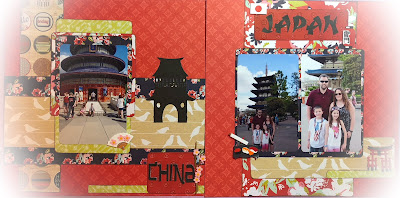
China and Japan

Image
Epcot was so much fun to walk through, really it was overwhelming and I feel like we need to go again to explore more. We stopped for a few photo ops and two of them were in "China" and "Japan". I used a challenge from The ScrapRoom Blog to do the China layout.  First the whole picture: To create this layout I used: Paper House: One Big Happy Family paper stack System Font: China dingbat System Font: Made in China - China title System Font: Karate - Japan title Disney Japan Sticker pack The Challenge: And my interpretation: Thank you so much for stopping by! Blessings,
Meeting Baymax

Image
My son got the opportunity to meet Baymax at Epcot Center. He loved that movie so it was a real treat! It was also a treat to scrap and I love how my layout came out. I used a sketch from the Sketches in Thyme challenge blog . It was a great sketch to work with! Check it out. The sketch: My Take: To Create this Layout I used: Echo Park: Magical Adventure - base paper DCWV: Dots, Strips, and Plaids stack DCWV: The Glitter Stack Bella Blvd: tabbies Wild Card 2 Cricut Cartridge: Title Mickey and Friends Cricut Cartridge: mickey heads ribbon Thank you so much for stopping by! Blessings,